DeepFocus v1.0.0 Official Release • 100% Free & Open Source

Reclaim Your Attention.
Minimalist Launcher & Absolute Focus Lock.

Replace endless doom-scrolling with mindful clarity. DeepFocus is an Android launcher engineered with uncompromising reboot-proof focus locks (1 min to 10 hours), atomic daily habit tracking, and zero telemetry.

100% On-Device (Zero Telemetry)
Survives Device Reboots
Battery-Saving OLED Black
No Root Required
Active Mockup View
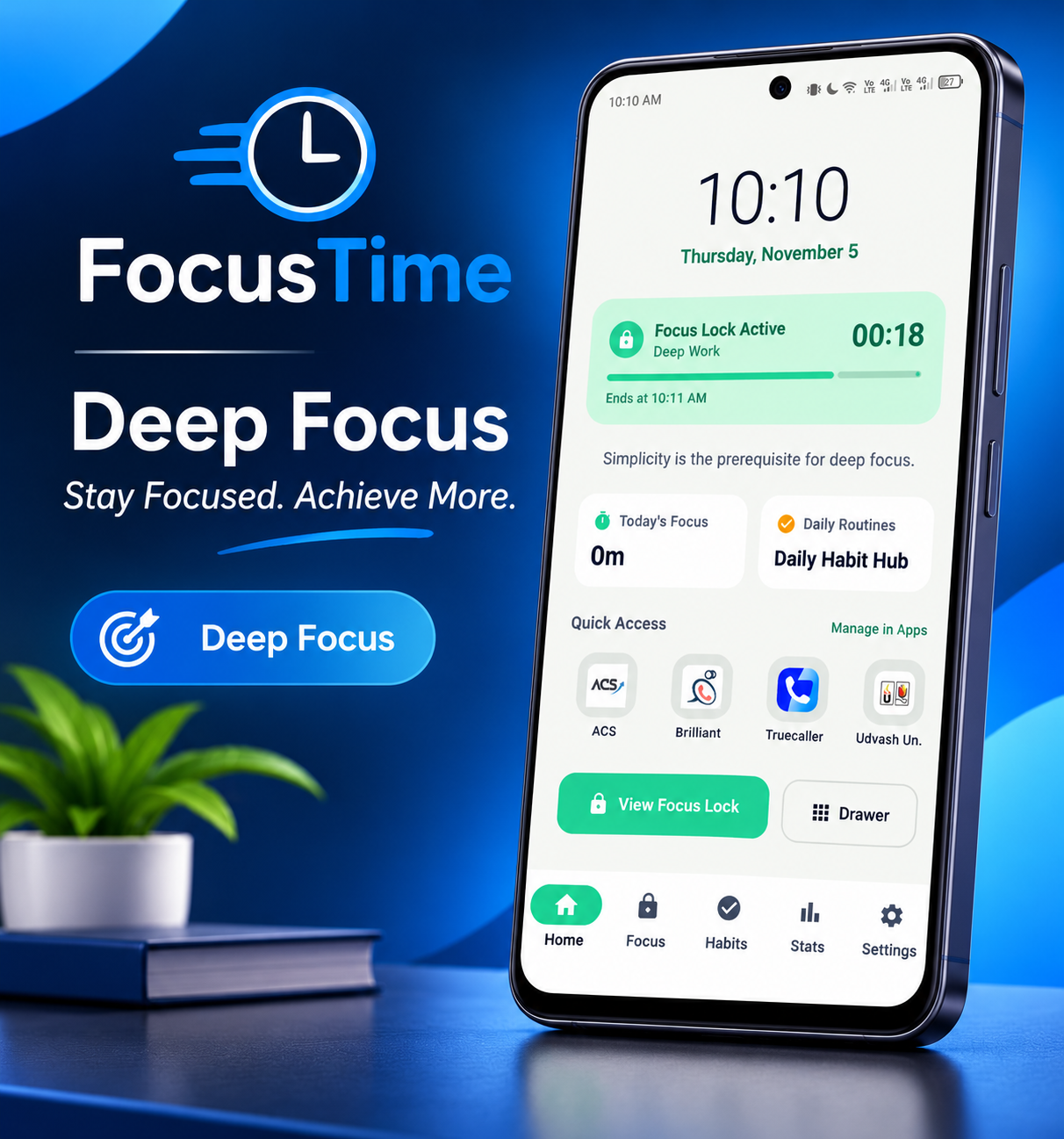
Minimalist Home Launcher
Large clean digital clock, daily inspirational quote, active focus streak, and 4 essential pinned apps dock.
600 Min
Max Focus Lock Range (1m – 10h)
0 KB
Cloud Telemetry (100% Local DB)
BOOT
Reboot-Proof Timer Persistence
100%
Free, Open Source & Zero Ads

Everything Inside the APK

A complete suite of productivity tools designed to protect your cognitive bandwidth.

Minimalist Launcher

Replaces your colorful, addiction-inducing home screen grid with a tranquil, intentional obsidian dashboard.

  • Large digital clock & current date
  • Daily mindful quotes to ground your focus
  • Pinned apps dock for vital tools only

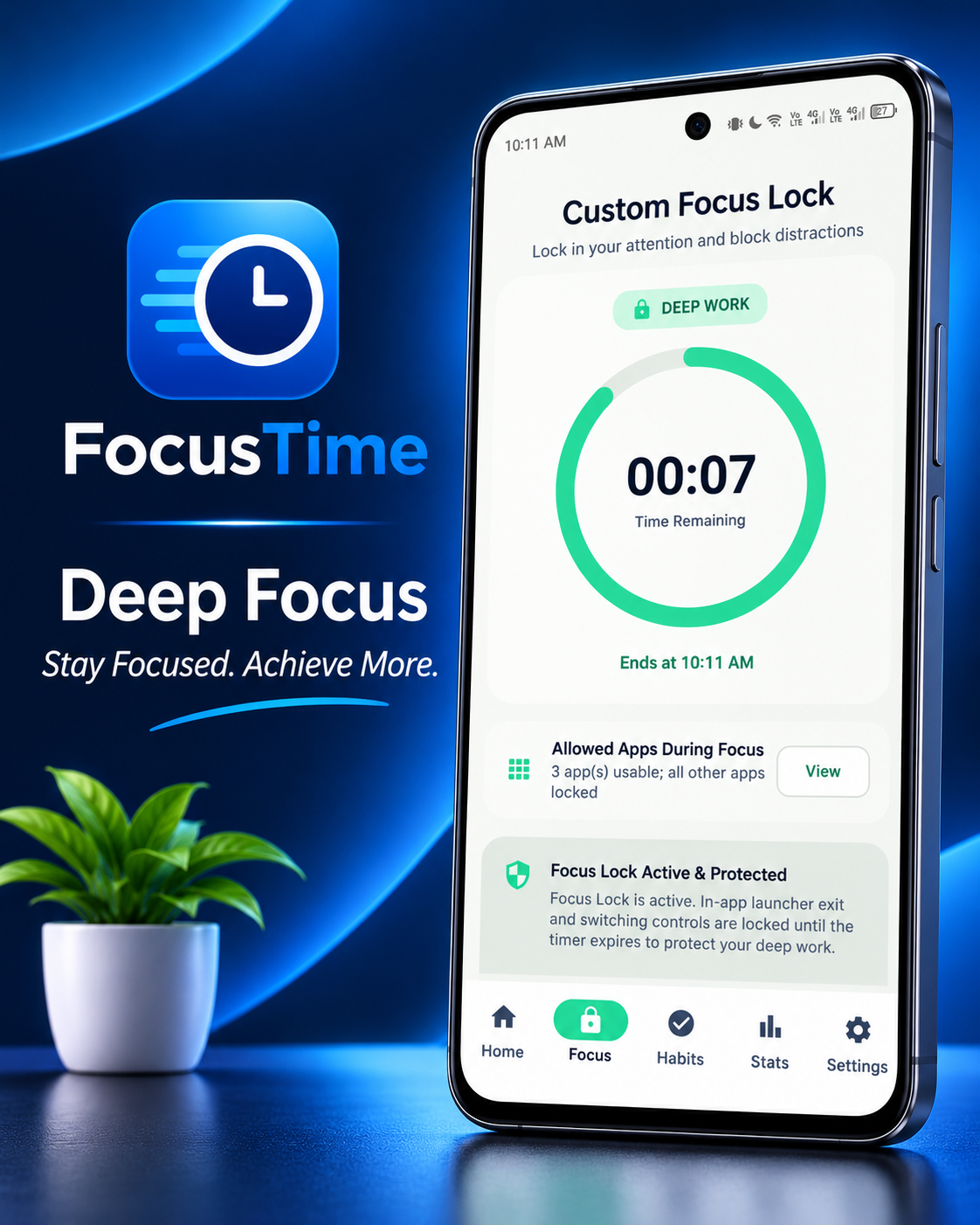
Focus Lock Engine

A rigorous focus timer with custom duration from 1 to 600 minutes and 6 instant presets (Pomodoro, Flow, Ultra).

  • Absolute system timestamp countdown
  • Locks exit buttons during active sessions
  • Haptic completion chime and vibration

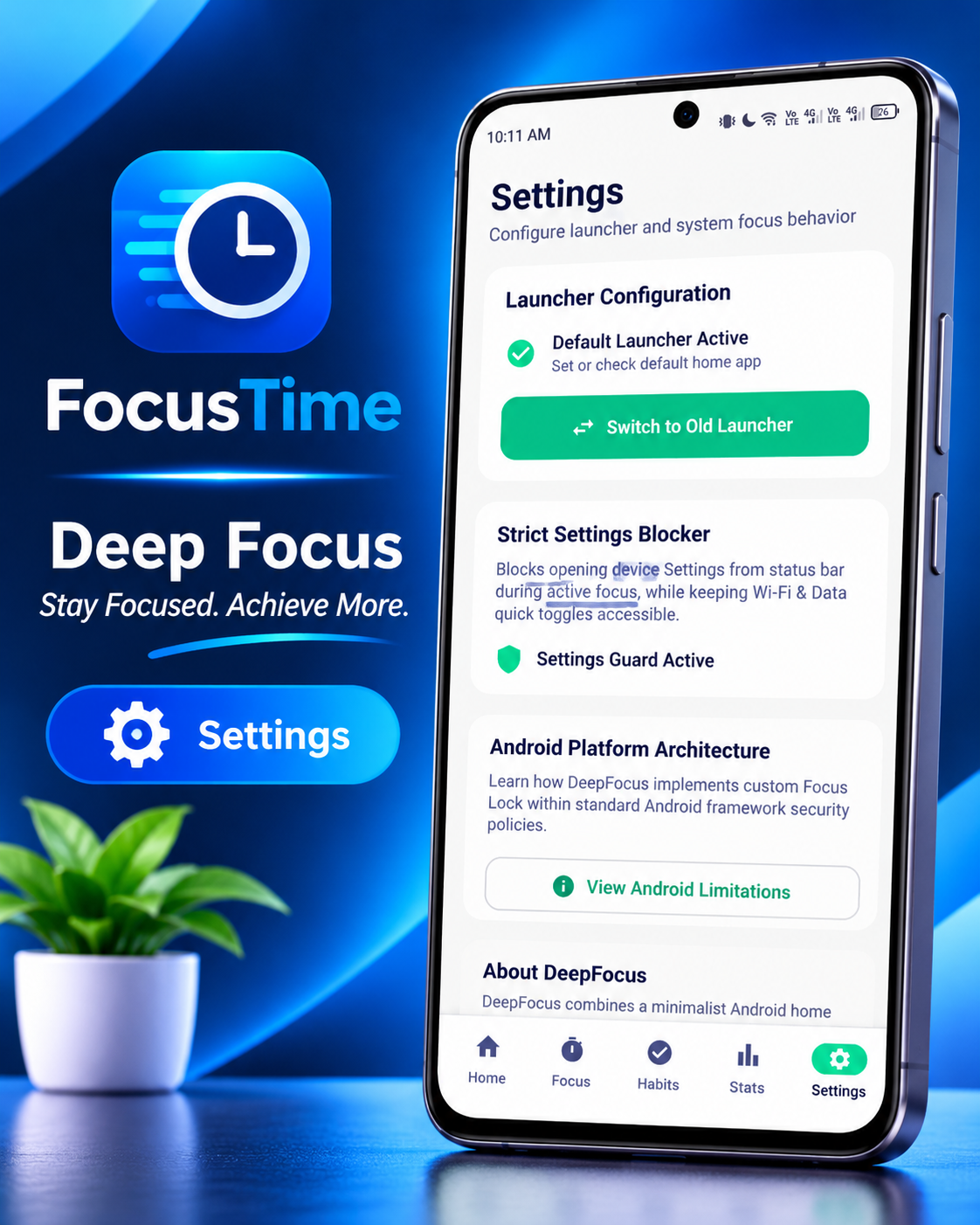
Settings Guard Accessibility

Companion accessibility service prevents bypass attempts by redirecting away from system settings during locked mode.

  • Blocks Settings bypass while focus is running
  • 100% on-device (zero network access)
  • One-tap toggle in DeepFocus Settings

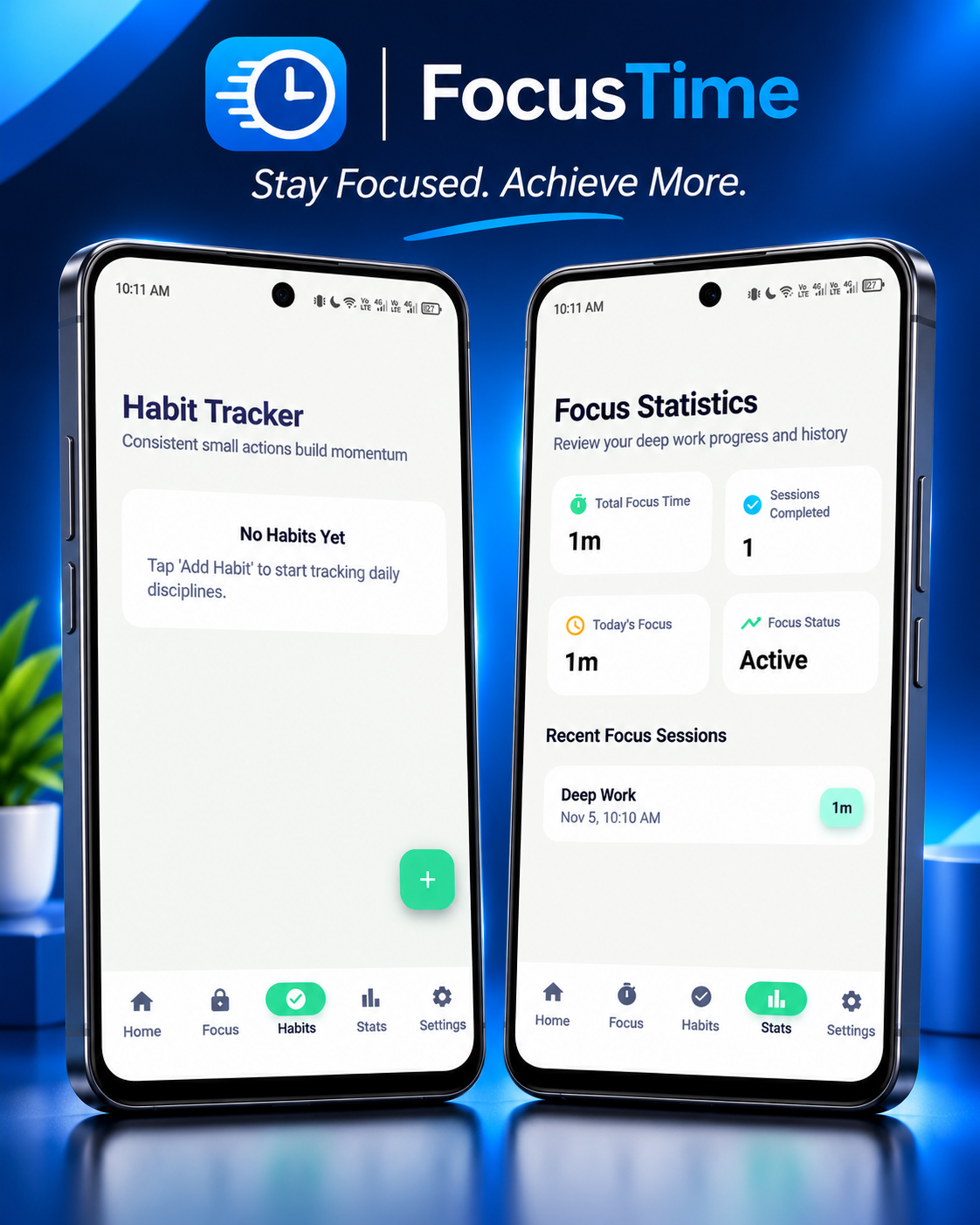
Atomic Habit Tracker

Maintain your daily winning streaks with an integrated habit checklist backed by Android Room SQLite database.

  • Daily check-in checklist with fire streak icons
  • Custom habit creation and streak calculation
  • Instant local SQLite durability

Deep Work Analytics

Visualize your daily productivity metrics, total focus time, sessions completed, and chronological session logs.

  • Total hours and minutes spent in deep flow
  • Completed sessions counter & daily progress
  • Detailed session history logs

Lightning A-Z App Drawer

A distraction-free, text-first app drawer with instant fuzzy search and quick pin toggles for your home dock.

  • Instant keyboard auto-focus search
  • Fast alphabetical jumping scrubber
  • 1-tap pin/unpin to home screen

How Much Time Will You Save?

The average person loses 4+ hours per day to unconscious social media checking and notification feeds. See what DeepFocus reclaims for your goals:

Estimated daily doom-scrolling: 3.5 Hours / Day
1,277 hrs
Reclaimed per year (~53 full 24-hr days) for reading, coding, health, and family!

Inspect Every Pixel

Click on any screen to open a high-resolution lightbox inspector.

Screen 1 DeepFocus Minimalist Home Launcher

Minimalist Launcher

Monochrome distraction-free Home Screen with digital clock, mindful reflection quotes, active streak counter, and vital pinned tools.

Click to inspect
Screen 2 Focus Lock Timer Screen

Focus Lock Session

Circular dial with presets (15m, 25m Pomodoro, 45m, 60m Flow, 90m, 120m). Absolute timestamp lock survives reboots & process kills.

Click to inspect
Screen 3 Habits Tracker Screen

Atomic Habits Tracker

Build unshakeable daily rituals with one-tap check-ins, continuous fire streak tracking, and local Room SQLite backup.

Click to inspect
Screen 4 Focus Analytics Screen

Productivity Analytics

Measure your true focus velocity. Track total hours spent in flow, sessions completed, daily goal adherence, and session logs.

Click to inspect

Experience the Focus Lock Engine

Test DeepFocus presets and timer mechanics directly in your browser.

25:00
POMODORO FOCUS
Ready to start. Launcher will enforce lock.

Choose Preset

Select a quick preset or adjust the slider to set your target deep work duration (1 to 600 min).

Custom Duration: 25 Minutes

How to Install the APK on Android

DeepFocus is an independent, open-source application. Follow these simple steps to install and configure it in less than 2 minutes.

1

Download the APK File

Tap the download button below or scan the QR code with your phone. The file is named deepfocus-debug.apk (~23 MB).

Download via GitHub Release Local Mirror Download
Direct APK Link: https://github.com/omor-com/DeepFocus/releases/download/V1.0.0/deepfocus-debug.apk
2

Allow "Install Unknown Apps"

When downloading via Google Chrome or your mobile browser, Android may show a standard notice: "File might be harmful". Tap Download anyway.

Security Tip: DeepFocus is 100% open-source and contains zero advertising SDKs or tracking code. This dialog is Android's standard warning for all APKs downloaded outside Google Play.
3

Tap Install & Google Play Protect

Open your notification bar or Downloads folder and tap deepfocus-debug.apk to initiate the package installer.

If Google Play Protect prompts with "Unrecognized app", tap "More details" and then tap "Install anyway".

Quick Guide: Once installed, tap Open to launch DeepFocus for the first time.
4

Set DeepFocus as Default Home App (Launcher)

Press your phone's Home button or swipe up. Android will ask which app to use as your Home app. Select DeepFocus and tap "Always".

Alternative: You can also go to your phone's Settings > Apps > Default Apps > Home App and select DeepFocus.
5

(Recommended) Enable Focus Guard Accessibility

To prevent bypassing locked focus sessions, open DeepFocus > swipe to Settings > tap "Enable Focus Guard Accessibility".

Why this matters: Focus Guard automatically redirects you back to your focus session if you try to open restricted distracting apps or kill the launcher while in active lock.

Install on Your Phone in Seconds

Viewing this page on your computer? Point your smartphone camera at this QR code to download the APK directly to your device.

Direct HTTPS Download • No Sign-In Needed
SCAN TO DOWNLOAD

Technical Specifications

Built with modern Android engineering standards, strict privacy, and zero bloatware.

App Architecture & Environment
Application ID com.deepfocus.omor.dev (or com.example)
Current Version 1.0.0 (Build 1)
Target Android Version Android 7.0 (API 24) through Android 15 & 16 (API 36)
Technology Stack Kotlin 2.0, Jetpack Compose, Material 3, Coroutines, StateFlow
Local Storage Room SQLite (100% on-device persistent records)
Telemetry & Analytics None (0 bytes transmitted, no remote tracking servers)
Package Permissions RECEIVE_BOOT_COMPLETED (Reboot persistence)
VIBRATE (Completion haptic feedback)
POST_NOTIFICATIONS (Ongoing lock notifications)
QUERY_ALL_PACKAGES (Populating the installed app drawer)
ACCESSIBILITY_SERVICE (Optional Focus Guard protection)

Frequently Asked Questions

Everything you need to know about DeepFocus and APK installation.

Why does Android warn that the APK might be harmful?
Android displays this generic security warning for every file installed outside the Google Play Store (sideloaded APKs). DeepFocus is completely safe, 100% open-source, and does not contain advertisements, malware, or background tracking. You can inspect the entire source code on GitHub.
How do I switch back to my phone's default launcher if needed?
You have full control over your device at all times. When a focus session is not running, simply go to your phone's Settings > Apps > Default Apps > Home App and select your manufacturer's original launcher (One UI, Pixel Launcher, etc.). You can switch back and forth anytime without losing your habits or focus statistics!
What happens if my phone reboots during an active focus lock?
DeepFocus is engineered specifically to prevent restarting the phone to cheat the timer. The session relies on an absolute system end-timestamp rather than a fragile in-memory countdown. DeepFocus registers a BootReceiver that restores the locked session and verifies remaining time the moment the phone turns back on.
Does DeepFocus consume extra battery in the background?
Quite the opposite! Because DeepFocus uses pure deep obsidian dark colors (#070B09 and #000000), AMOLED/OLED screens turn off pixels completely on the home screen. Combined with zero background telemetry and efficient local SQLite, DeepFocus consistently extends device battery life compared to animation-heavy launchers.
Is my habit and focus data private?
100% private. DeepFocus doesn't require an account, email, or cloud login. All habit data, session records, and pinned applications are stored exclusively inside your phone's encrypted Room SQLite database. Your data never leaves your device.

Reclaim Your Days Starting Today

Join thousands of knowledge workers, developers, and students eliminating screen addiction and mastering deep work with DeepFocus.

Download APK (v1.0.0) View on GitHub
Action completed